> ## Documentation Index
> Fetch the complete documentation index at: https://agno-v2-update-deprecated-models.mintlify.site/llms.txt
> Use this file to discover all available pages before exploring further.
# AgentOS on AWS
> Run AgentOS on AWS ECS.
This template runs AgentOS on your own production-grade AWS infrastructure with ECS Fargate, RDS PostgreSQL, and an application load balancer.
## Prerequisites
* [Docker Desktop](https://docs.docker.com/get-docker/)
* An API key from a model provider
* [AWS CLI](https://docs.aws.amazon.com/cli/latest/userguide/getting-started-install.html) installed and configured (with credentials)
## Step-by-step Guide
* Install [Docker Desktop](https://docs.docker.com/desktop/install/mac-install/)
* Install [uv](https://docs.astral.sh/uv/) (Python package manager)
```bash theme={null}
uv venv --python 3.12
source .venv/bin/activate
```
```bash theme={null}
uv pip install -U 'agno[infra]'
```
```bash theme={null}
ag infra create --template agentos-aws --name agentos-aws
cd agentos-aws
```
Or clone directly: `git clone https://github.com/agno-agi/agentos-aws-template.git`
```bash theme={null}
export OPENAI_API_KEY=sk-***
```
Agno works with any model provider. Just update the agents in your codebase.
Update `infra/settings.py` with your AWS configuration:
```python theme={null}
infra_settings = InfraSettings(
aws_region="us-east-1",
subnet_ids=["subnet-xxx", "subnet-yyy"],
image_repo="[ACCOUNT_ID].dkr.ecr.us-east-1.amazonaws.com",
)
```
```bash theme={null}
ag infra up
```
Open [http://localhost:8000/docs](http://localhost:8000/docs) to verify it works.
```bash theme={null}
ag infra up prd:aws
```
Press Enter to confirm. This creates:
* Docker image pushed to ECR
* RDS PostgreSQL instance
* ECS Cluster, Service, and Task Definition
* Application Load Balancer with Target Group
RDS takes about 5 minutes to provision. Monitor progress on the AWS Console.
Find your Load Balancer DNS in the AWS Console (EC2 → Load Balancers). Navigate to `https:///docs` to see your AgentOS API.
1. Open [os.agno.com](https://os.agno.com)
2. Click "Connect OS" and select "Live"
3. Enter your Load Balancer DNS as the endpoint
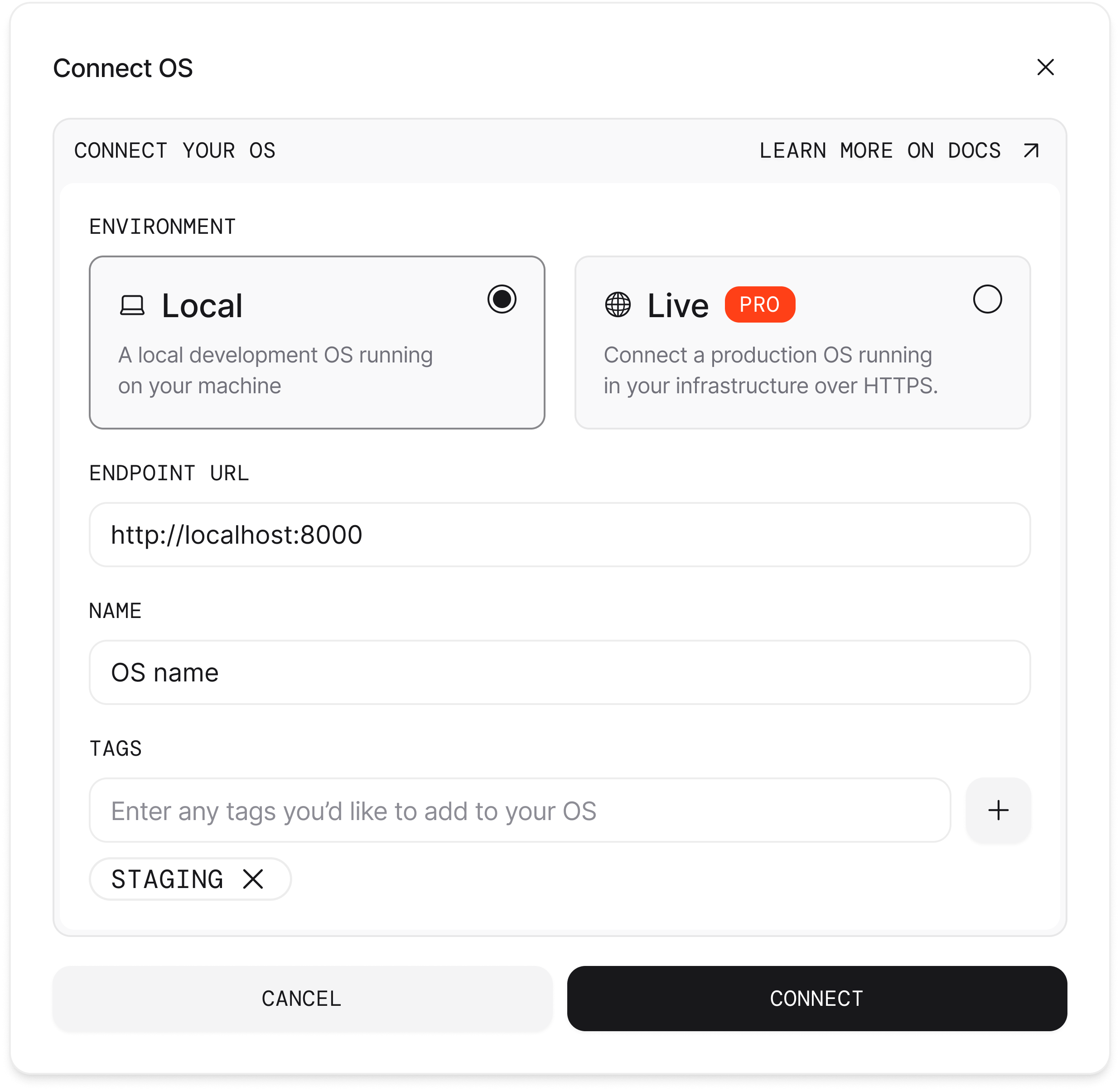 Your AgentOS is now deployed on AWS and connected to the control plane. You can now use it to build and deploy agents to production.
## Tips
**Update deployment**: After making changes to your agents:
```bash theme={null}
ag infra patch prd:aws
```
**Stop deployment**:
```bash theme={null}
ag infra down prd:aws
```
This removes all AWS resources including the database. Back up your data
first.
```
agentos-aws/
├── agents/ # Your agents
├── teams/ # Your teams
├── workflows/ # Your workflows
├── app/ # AgentOS directory
├── db/ # Database tables
├── infra/ # AWS infrastructure configuration │
└── settings.py # InfraSettings (region, subnets, etc.)
├── compose.yml # Docker Compose for local testing
├── Dockerfile # Container build
└── pyproject.toml # Python dependencies
```
The `ag infra up prd:aws` command provisions the following AWS resources:
* **ECR**: Container registry for your Docker image
* **ECS Fargate**: Serverless container hosting
* **RDS PostgreSQL**: Managed database with pgvector
* **Application Load Balancer**: HTTPS endpoint
* **AWS Secrets Manager**: Secure credential storage
* **Security Groups**: Network access controls
Estimated monthly costs (US East):
* ECS Fargate: \$30-50
* RDS db.t3.micro: \$15-20
* Load Balancer: \$20-25
Total: \~\$65-100/month. Use the [AWS Pricing Calculator](https://calculator.aws/) for detailed estimates.
## Troubleshooting
The RDS instance takes about 5 minutes to provision. Check status in the AWS
Console (RDS → Databases).
View task logs in CloudWatch. Common issues: missing environment variables,
incorrect database connection string.
The ECS service may still be starting. Wait 2-3 minutes for health checks to
pass.
Your AgentOS is now deployed on AWS and connected to the control plane. You can now use it to build and deploy agents to production.
## Tips
**Update deployment**: After making changes to your agents:
```bash theme={null}
ag infra patch prd:aws
```
**Stop deployment**:
```bash theme={null}
ag infra down prd:aws
```
This removes all AWS resources including the database. Back up your data
first.
```
agentos-aws/
├── agents/ # Your agents
├── teams/ # Your teams
├── workflows/ # Your workflows
├── app/ # AgentOS directory
├── db/ # Database tables
├── infra/ # AWS infrastructure configuration │
└── settings.py # InfraSettings (region, subnets, etc.)
├── compose.yml # Docker Compose for local testing
├── Dockerfile # Container build
└── pyproject.toml # Python dependencies
```
The `ag infra up prd:aws` command provisions the following AWS resources:
* **ECR**: Container registry for your Docker image
* **ECS Fargate**: Serverless container hosting
* **RDS PostgreSQL**: Managed database with pgvector
* **Application Load Balancer**: HTTPS endpoint
* **AWS Secrets Manager**: Secure credential storage
* **Security Groups**: Network access controls
Estimated monthly costs (US East):
* ECS Fargate: \$30-50
* RDS db.t3.micro: \$15-20
* Load Balancer: \$20-25
Total: \~\$65-100/month. Use the [AWS Pricing Calculator](https://calculator.aws/) for detailed estimates.
## Troubleshooting
The RDS instance takes about 5 minutes to provision. Check status in the AWS
Console (RDS → Databases).
View task logs in CloudWatch. Common issues: missing environment variables,
incorrect database connection string.
The ECS service may still be starting. Wait 2-3 minutes for health checks to
pass.