> ## Documentation Index
> Fetch the complete documentation index at: https://agno-v2-update-deprecated-models.mintlify.site/llms.txt
> Use this file to discover all available pages before exploring further.
# AgentOS on Docker
> Run AgentOS locally using Docker.
This template includes AgentOS and PostgreSQL with pgvector. Run locally for development, or deploy to any cloud that supports Docker.
## Prerequisites
* [Docker Desktop](https://docs.docker.com/get-docker/)
* An API key from a model provider
## Step-by-step Guide
* Install [Docker Desktop](https://docs.docker.com/desktop/install/mac-install/)
* Install [uv](https://docs.astral.sh/uv/) (Python package manager)
```bash theme={null}
uv venv --python 3.12
source .venv/bin/activate
```
```bash theme={null}
uv pip install -U 'agno[infra]'
```
```bash theme={null}
ag infra create --template agentos-docker --name agentos-docker
cd agentos-docker
```
Or clone directly: `git clone
https://github.com/agno-agi/agentos-docker-template.git`
```bash theme={null}
export OPENAI_API_KEY=sk-***
```
Agno works with any model provider. Just update the agents in your codebase.
```bash theme={null}
docker compose up -d --build
```
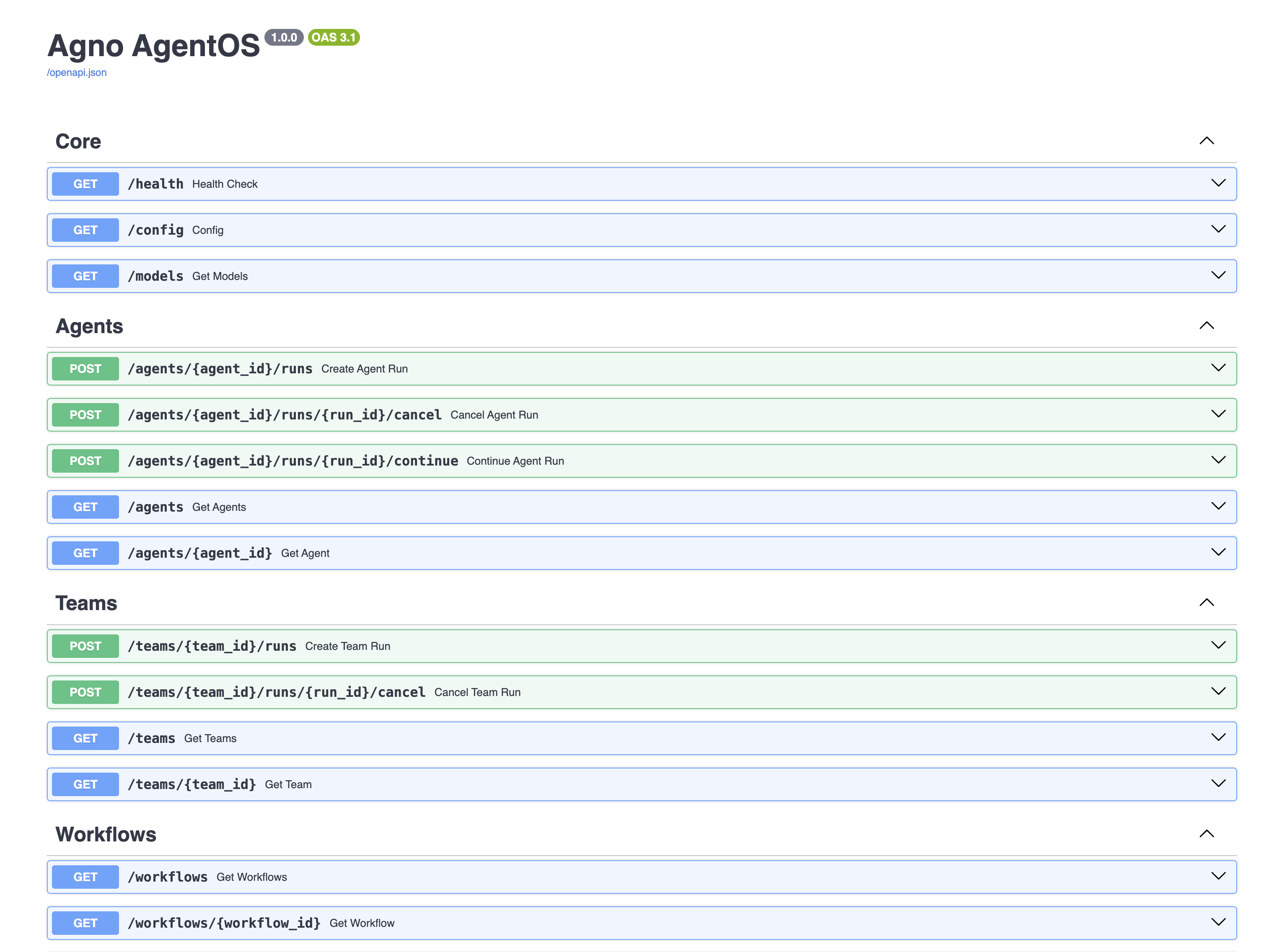
Open [http://localhost:8000/docs](http://localhost:8000/docs) to see your AgentOS API:
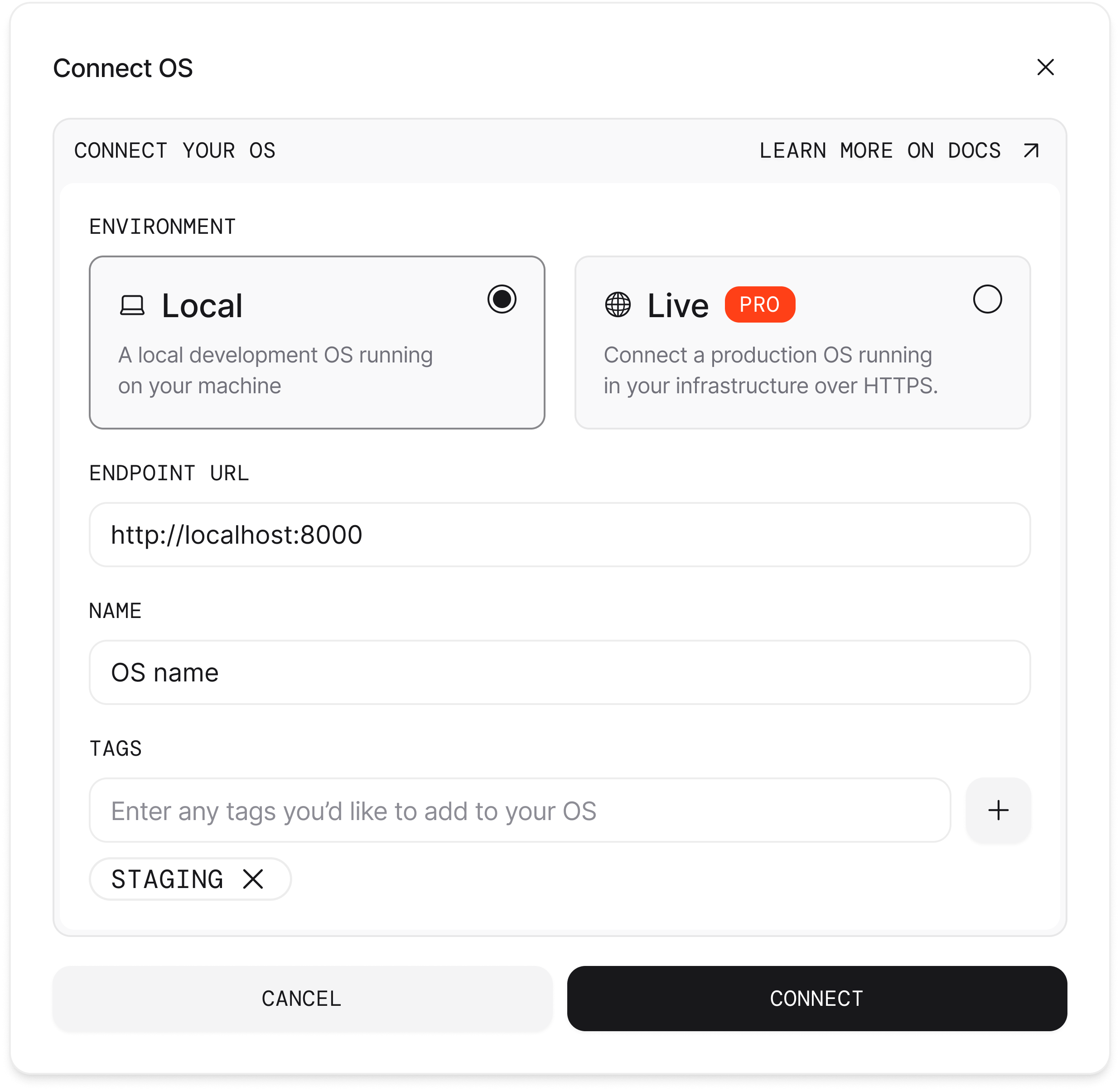
 1. Open [os.agno.com](https://os.agno.com)
2. Click "Connect OS" and select "Local"
3. Enter `http://localhost:8000`
1. Open [os.agno.com](https://os.agno.com)
2. Click "Connect OS" and select "Local"
3. Enter `http://localhost:8000`
 Your AgentOS is deployed in a docker container and is accessible at `http://localhost:8000`.
## Tips
You can also deploy this template to any cloud that supports Docker.
* **Cloud providers:** [AWS ECS](https://aws.amazon.com/ecs/), [Google Cloud Compute Engine](https://cloud.google.com/compute-engine/), [Azure Virtual Machines](https://azure.microsoft.com/en-us/products/virtual-machines/)
* **Platforms:** [Railway](https://railway.app/), [Render](https://render.com/), [DigitalOcean](https://digitalocean.com/), [Fly.io](https://fly.io/), [Modal](https://modal.com/)
Changes to agents, teams, and workflows are reflected automatically.
Restart containers when updating environment variables.
| ag infra | docker compose | Description |
| ------------------ | ------------------------------ | ------------------ |
| `ag infra up` | `docker compose up -d --build` | Start containers |
| `ag infra down` | `docker compose down` | Stop containers |
| `ag infra restart` | `docker compose restart` | Restart containers |
| | `docker compose logs -f` | View logs |
```
agentos-docker/
├── agents/ # Your agents
├── teams/ # Your teams
├── workflows/ # Your workflows
├── app/ # AgentOS directory
├── db/ # Database tables
├── compose.yml # Docker Compose configuration
├── Dockerfile # Container build
├── pyproject.toml # Python dependencies
└── scripts/ # Helper scripts
```
## Troubleshooting
Modify `compose.yml`: `yaml ports: - "8080:8000" # Change 8000 to 8080 `
Ensure PostgreSQL is running: `bash docker compose ps ` If the database
isn't ready, wait a few seconds and try again.
Your AgentOS is deployed in a docker container and is accessible at `http://localhost:8000`.
## Tips
You can also deploy this template to any cloud that supports Docker.
* **Cloud providers:** [AWS ECS](https://aws.amazon.com/ecs/), [Google Cloud Compute Engine](https://cloud.google.com/compute-engine/), [Azure Virtual Machines](https://azure.microsoft.com/en-us/products/virtual-machines/)
* **Platforms:** [Railway](https://railway.app/), [Render](https://render.com/), [DigitalOcean](https://digitalocean.com/), [Fly.io](https://fly.io/), [Modal](https://modal.com/)
Changes to agents, teams, and workflows are reflected automatically.
Restart containers when updating environment variables.
| ag infra | docker compose | Description |
| ------------------ | ------------------------------ | ------------------ |
| `ag infra up` | `docker compose up -d --build` | Start containers |
| `ag infra down` | `docker compose down` | Stop containers |
| `ag infra restart` | `docker compose restart` | Restart containers |
| | `docker compose logs -f` | View logs |
```
agentos-docker/
├── agents/ # Your agents
├── teams/ # Your teams
├── workflows/ # Your workflows
├── app/ # AgentOS directory
├── db/ # Database tables
├── compose.yml # Docker Compose configuration
├── Dockerfile # Container build
├── pyproject.toml # Python dependencies
└── scripts/ # Helper scripts
```
## Troubleshooting
Modify `compose.yml`: `yaml ports: - "8080:8000" # Change 8000 to 8080 `
Ensure PostgreSQL is running: `bash docker compose ps ` If the database
isn't ready, wait a few seconds and try again.